Table of Contents
Standard columns
Toolbar
None.
General
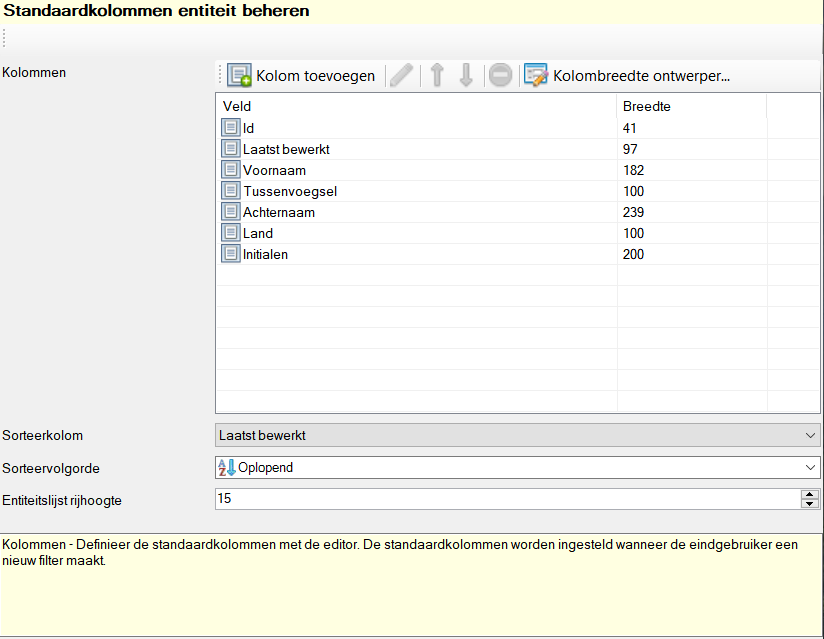
Within the Default columns you determine the default columns used in the view application when adding a new filter.
Manage default entity columns
Settings
Columns
Here you determine which columns are included in the standard columns, as well as the order and width of the columns. A field can be included multiple times as a column.
Toolbar
All toolbar buttons are explained below.
| Command | Description | |
|---|---|---|
| image | Add column | Add a column |
| image | Edit | Edit selected column |
| image | Move item up | Move selected column up one line |
| image | Move item down | Move selected column down one line |
| image | Delete | Delete selected column from the list |
| image | Column width designer… | Opens a designer to visually adjust the width of columns |
Sort column
Here you specify the column used for sorting entities.
Sort order
Here you define which way the data should be sorted. This can be Ascending or Descending be.
| Sort order | Example numeric | Example alphanumeric |
|---|---|---|
| Ascending | 1,2,3,4…,9,10,11 | A,B,C,D… |
| Descending | 11,10,9,…,4,3,2,1 | …,D,C,B,A |
Entity list row height
Sets the height of the row in the object list, this can be used to display images, for example. The minimum row height is 15 pixels, in addition a dynamic minimum row height is enforced based on the font size.
Hotkeys
Window wide
See main window.
Component specific
None.


