Table of Contents
New database window
Toolbar
No
Status bar
No
Actions
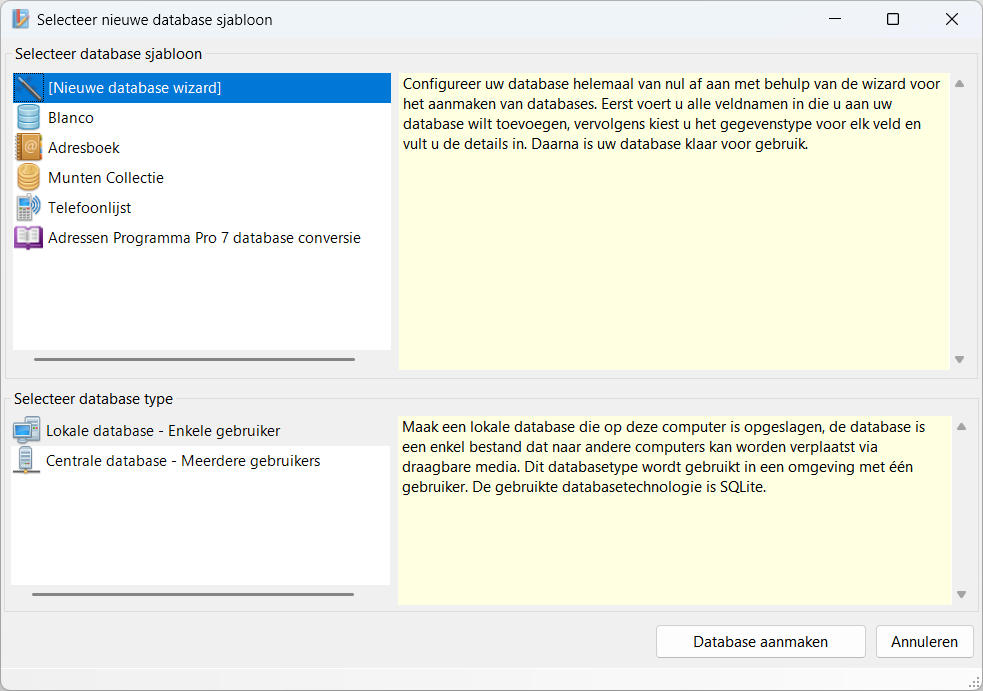
In this window, choose the template for your new database.
Template
Here you choose the template for your database, this can be one of the examples or you choose to build your database step by step as you wish via the [New database wizard].
In addition, you have the option of converting your address book from Addresses Program Pro 7 to Database Application Pro 8.
Type
Next, select the type of database you want to create.
Local database
A local database is a database consisting of a single file. This file is normally stored on your local computer, but it can also be stored on a network location. However, a local database can only be opened by one user at a time. The user who has opened the database locks the database file so that it cannot be opened by other users; as soon as the user who is using the database closes the application, the database is released to another user.
If you try to open a local database that is already in use, the programme will give a message that it is already in use by another application.
The database technology used is : SQLite
Central database
The central database runs on a central database server. This has the advantage that multiple users can access and modify the database at the same time.
At the moment, only the Local database available, the Central database is still under development.
The database technology used is : Microsoft SQL Server
Window
The following shortcuts are valid across the entire window, they do not depend on the focus on a particular component
| Hotkey | Action |
|---|---|
| F1 | Call up online documentation. |
| Alt + F4 | Close window. |


